Rekrutek Hire Pay Transparency
In the U.S., some states have enacted pay transparency laws to promote fairness, reduce wage gaps, and improve workplace equity. These laws require employers to disclose salary ranges in job postings or provide pay information upon request. It is important to note that pay transparency is broad and covers when and how companies disclose pay to their applicants, as well as restrictions on requesting salary history or penalizing employees who share their pay information.
Pay transparency law benefits include:
- Reduce wage gaps: Pay transparency helps address gender and racial wage disparities by ensuring that salaries are based on roles and qualifications rather than biased negotiation practices.
- Empowers workers: Employees can make more informed career decisions and negotiate fair wages when they have access to pay information.
- Encourage employer accountability: Public salary disclosures encourage companies to standardize pay practices, reducing the risk of discriminatory pay gaps.
- Improve hiring efficiency: Clear salary ranges reduce wasted time in the hiring process by aligning candidate expectations with employer budgets upfront.
- Boost employee trust and retention: When employees understand pay structures, they are more likely to feel valued and stay with their employer.
Pay Transparency States
Section titled “Pay Transparency States”The following table lists which states have pay transparency laws in place as of 2025, what the pay transparency requirements are, and when manual action is required because the transparency requirements are not automated by Rekrutek.
| State | Pay Transparency Required | Manual Action Required |
|---|---|---|
| Alabama | No | No |
| Alaska | No | No |
| Arizona | No | No |
| Arkansas | No | No |
| California | Yes, in job postings | No. Automated by Rekrutek. |
| Colorado | Yes, in job postings | No. Automated by Rekrutek. |
| Connecticut | Only at the applicant’s request or when an offer of pay is made | Yes. Configure workflows and messaging to support pay transparency requirements |
| Delaware | No | No |
| Florida | No | No |
| Georgia | No | No |
| Hawaii | Yes, in job postings | No. Automated by Rekrutek. |
| Idaho | No | No |
| Illinois | Yes, in job postings | No. Automated by Rekrutek. |
| Indiana | No | No |
| Iowa | No | No |
| Kansas | No | No |
| Kentucky | No | No |
| Louisiana | No | No |
| Maine | No | No |
| Maryland | Yes, in job postings | No. Automated by Rekrutek. |
| Massachusetts | Yes, in job postings as of 2025 | No. Automated by Rekrutek. |
| Michigan | Typically no. However, Detroit has some ordinances for city contractors/public sector | Yes. Configure workflows and messaging to support pay transparency requirements |
| Minnesota | Yes, in job postings | No. Automated by Rekrutek. |
| Mississippi | No | No |
| Missouri | No | No |
| Montana | No | No |
| Nebraska | No | No |
| Nevada | Only after the applicant completes an interview | Yes. Configure workflows and messaging to support pay transparency requirements |
| New Hampshire | No | No |
| New Jersey | Yes, in job postings as of 2025. Jersey City already requires | No. Automated by Rekrutek. |
| New Mexico | No | No |
| New York | Yes, in job postings | No. Automated by Rekrutek. |
| North Carolina | No | No |
| North Dakota | No | No |
| Ohio | Yes | No. Automated by Rekrutek. |
| Oklahoma | No | No |
| Oregon | No | No |
| Pennsylvania | No | No |
| Rhode Island | Only at the applicant’s request, and at the time of hire | Yes. Configure workflows and messaging to support pay transparency requirements |
| South Carolina | No | No |
| South Dakota | No | No |
| Tennessee | No | No |
| Texas | No | No |
| Utah | No | No |
| Vermont | Yes, in job postings | No. Automated by Rekrutek. |
| Virginia | No | No |
| Washington | Yes, in job postings | No. Automated by Rekrutek. |
| Washington, D.C. | Yes, in job postings | No. Automated by Rekrutek. |
| West Virginia | No | No |
| Wisconsin | No | No |
| Wyoming | No | No |
| Puerto Rico | No | No |
| U.S. Virgin Islands | No evidence of required pay transparency in job postings | No |
| Guam | No | No |
| American Samoa | No | No |
| Northern Mariana Islands | No evidence of required pay transparency in job postings | No |
Enabling Pay Transparency Settings
Section titled “Enabling Pay Transparency Settings”To enable pay transparency settings, an Administrator will follow the steps below:
-
On any Rekrutek page, click your initials icon in the top right corner. Then click Company Settings in the dropdown. You will land on General settings by default.
-
Scroll down to the Display opening pay ranges and opening pay rates section.
-
Choose the appropriate toggle based on your company’s needs. The options are:
- On all application forms and sourcing feeds: Will always display pay rate or range regardless of the state the Opening is in.
- For US opening locations: only where legally required: Will only display pay rate or range if the stage the Opening is in requires the pay rate/range to be shown to the applicant.
- For US opening locations where legally required, but allow opening level transparency controls where not legally required: Will always display pay rate or range regardless of the state the Opening is in during Opening creation. However, if the state does not have pay transparency laws, the user can choose to hide the pay rate/range.
-
Click Update Applicants Setting to save changes.
Creating Openings User Experience
Section titled “Creating Openings User Experience”When a user is creating a new Opening in Rekrutek Hire, they will see a different experience based on which pay Opening Pay Range/Rate toggle was selected by an Administrator.
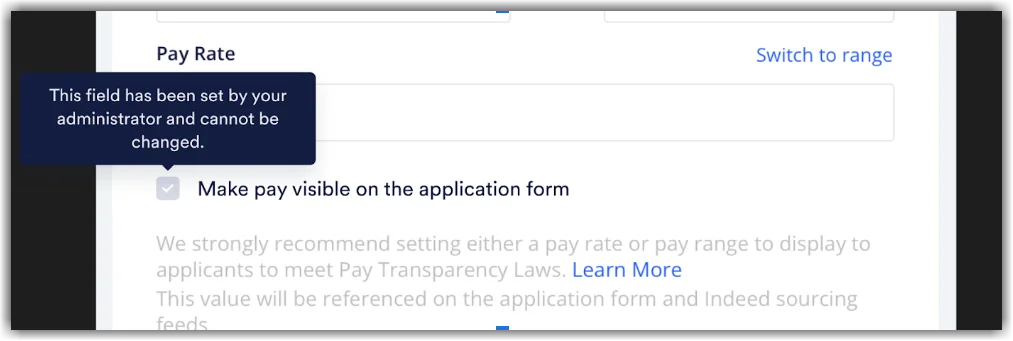
On all application forms and sourcing feeds:
Section titled “On all application forms and sourcing feeds:”The user will see the Make pay visible on the application form box checked and will be unable to uncheck the box. If the user hovers over this checkbox, they will be informed that the field has been set by their administrator and cannot be changed, as seen below:
For US opening locations: only where legally required
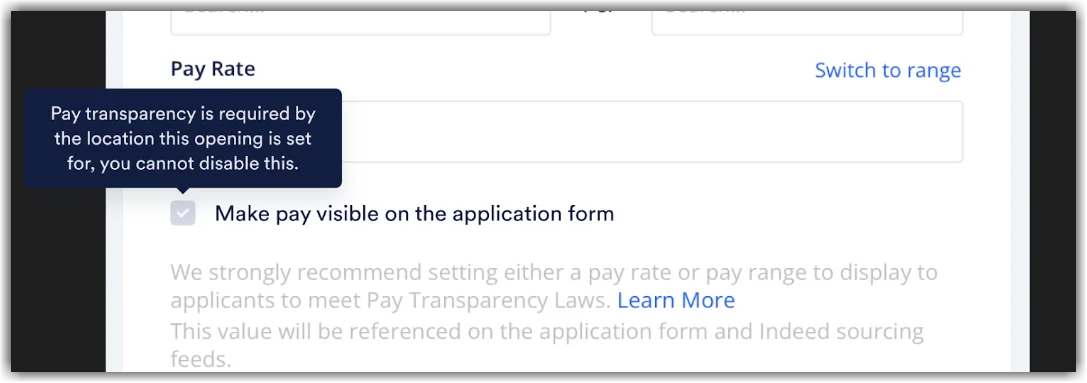
Section titled “For US opening locations: only where legally required”The user will see the Make pay visible on the application form box checked and will be unable to uncheck the box if the Opening is being created in a state with pay transparency requirements. If the user hovers over this checkbox, they will be informed that pay transparency is required by the location where this opening is set. You cannot disable this, as seen below:
For US opening locations where legally required, but allow opening level transparency controls where not legally required:
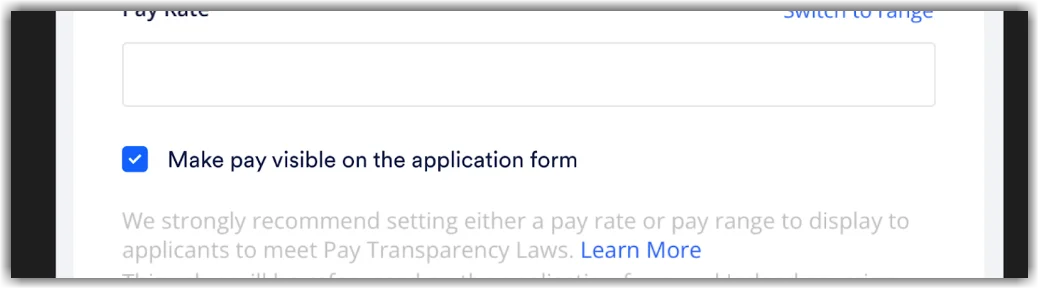
Section titled “For US opening locations where legally required, but allow opening level transparency controls where not legally required:”The user will see the Make pay visible on the application form box unchecked and will be able to check the box if the Opening is being created in a state without pay transparency requirements, as seen below. If the state does have pay transparency requirements, the box will be automatically checked, and the user will not have the ability to uncheck the box, as seen in the screenshot above.