
Enhance the Applicant Portal with iFrame, Javascript, or Redirects
Rekrutek allows the ability to embed content within the body of a stage where applicants can engage with the additional content. You can embed iFrames, Javascript, or even a redirect to a website outside of the Rekrutek application.
iFrame
Section titled “iFrame”An iFrame is a window inside a window. It can be added on to any stage using HTML.
To add an iFrame to the stage body, follow the steps below:
-
Access the Workflow Editor and click the stage you want to add the iFrame to.
-
Click Customize in the top right corner of the stage details section.
-
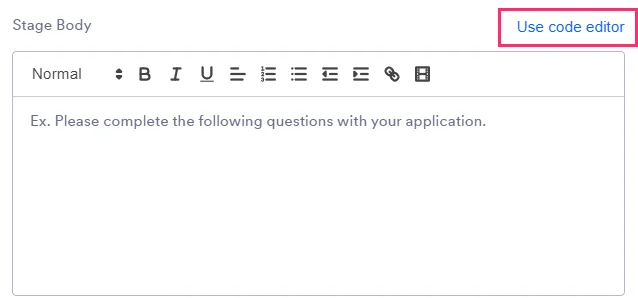
In the Stage Body section, click Use code editor.
-
Paste the responsive iFrame code in the box. If you need to create a responsive iFrame, use this website.
-
Click Save Edits.
-
Rekrutek recommends checking that the iFrame is mobile responsive by previewing the stage from your mobile device.
Javascript
Section titled “Javascript”Additional Custom Scripts can be added to each stage for additional customization.
To add a Custom Script:
-
Access the Workflow Editor and click the stage you want to add the Javascript to.
-
Click Customize in the top right corner of the stage details section.
-
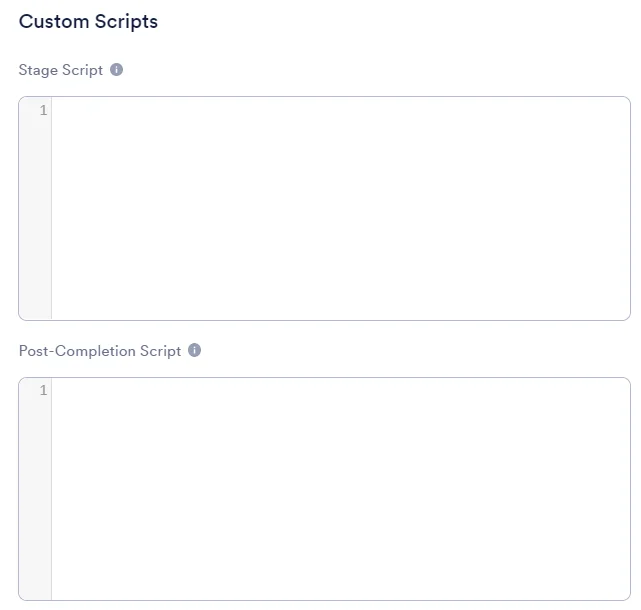
In the Custom Scripts section, choose whether you want the Javascript to be executed when an applicant lands on the stage (Stage Script box) or after they complete the stage (Post-Completion Script box).
-
Paste the Custom Script.
-
Click Save Edits.
Redirects
Section titled “Redirects”You can also set up a redirect within a stage to send your applicants out of Rekrutek. If you set up a redirect, you must create an API redirect back to Rekrutek or rely on automated stage communication for applicants to reaccess the Rekrutek application.
To add a redirect:
- Access the Workflow Editor and click the stage you want to add the Javascript to.
- Click Customize in the top right corner of the stage details section.
- In the Custom Scripts section, paste the following redirect code, enter your redirect URL in the XXXX section of the code, and click Save Edits.
<!DOCTYPE html><html><head><title>Redirect url</title></head><body><script>var url= "XXXX";window.location = url;</script></body></html>