
Data Entry Validation [Developer]
In the Data Collection Stage, short answers can be restricted to follow a specific format using Data Entry Validation. You can customize the parameters to what the applicant can enter. For example, Data Entry Validation can ensure that the answer to the short answer question “California Driver’s License number” must start with a letter followed by 7 digits.
To express this validation format, you’ll be using Regular Expression (RegEx), a coding language that uses a sequence of characters that defines a pattern. We recommend you consult your developers to help ensure your RegEx is functioning as intended.
Adding Validation to Short Answer
Section titled “Adding Validation to Short Answer”You can only use the Data Entry Validation feature for custom questions with a short answer.
-
Add a Data Collection stage.
-
Click Customize fields for data collection stage.
-
Click Add Question. Type in your custom question and data key.
-
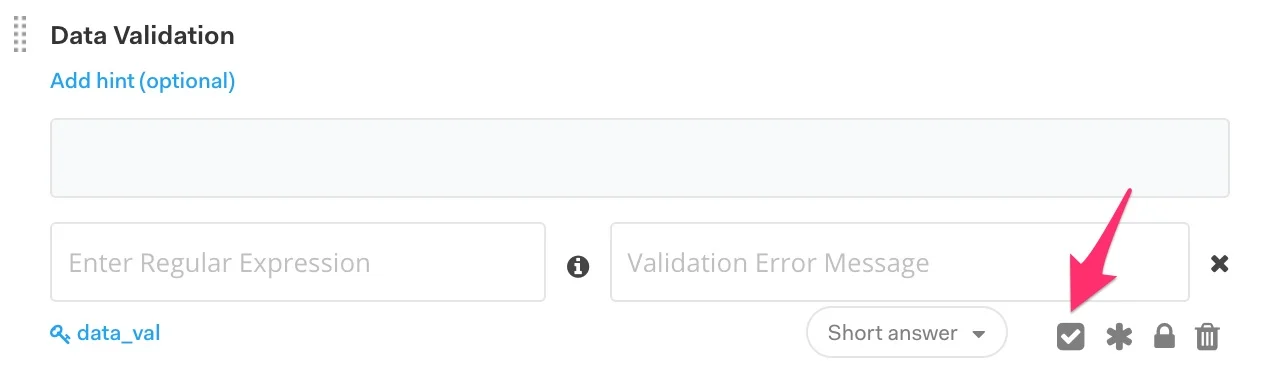
Choose Short answer as your answer type. Click the checkbox on the bottom right of the question.
-
On the left text box, enter in the format the answer needs to be in using RegEx.
-
On the right text box, enter the error message applicants will get if they enter an incorrect format.
-
Click Save, and you’re set!
Common RegEx Validations
Section titled “Common RegEx Validations”Copy-paste the RegEx into the Enter Regular Expression text box if you want to use it. Keep in mind that these will not have the “/” that starts and ends the expression, as these are unnecessary. These are some of the common expressions – for more complex expressions, please consult your developers/tech team.
| Date Type | RegEx checks for: | Regular Expression: |
|---|---|---|
| Social Security Number | 9 digits | ^\d{9}$ |
| Zip Code (US) | 5 digits | ^\d{5}$ |
| Bank Number (US) | 4 to 17 digits | ^\d{4,17}$ |
| Passport | 6 to 9 upper-case letters or digits | ^[A-Z0-9]{6,9}$ |
| License Plate Number (CA) | 1 digit, then 3 upper-case letters, then 3 digits | ^\d[A-Z]{3}\d{3}$ |
| Driver’s License Number (CA) | 1 upper-case letter and 7 digits | ^[A-Z]{1}[0-9]{7}$ |
| Must have an @ > a period > with characters throughout | ^\w[\w.+\-]*@\w[.\w]*\.\w+$ |
|
| Date | mm/dd/yyyy | ^(0[1-9]|1[012])[\- \.](0[1-9]|[12][0-9]|3[01])[\- \.](19|20)\d\d$ |
| Date | dd-mm-yyyy | ^(0[1-9]|[12][0-9]|3[01])[\- \.](0[1-9]|1[012])[\- \.](19|20)\d\d$ |